Memory
Build a browser-based, feature-packed card Memory matching game (project 3)
About Memory
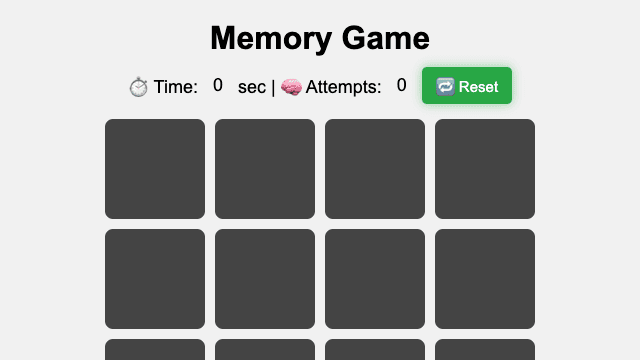
Memory is a free online browser game built for quick browser play on Game 4 Fun. It gives players a clear board experience with fast loading, simple access, and no download required. The main goal is to understand the objective, react to each new situation, and keep improving your result through repeated attempts. Because Memory is grouped with Board games, it is easy to find alongside related browser challenges and similar HTML5 releases. The best runs come from careful observation, steady timing, and learning how the game responds after each move. Game 4 Fun keeps the experience close to the original Open Source release while making it easy to launch from a modern browser. Play it when you want a quick session, then return later to chase a better score, cleaner strategy, faster solution, or more confident run. The page also includes controls, gameplay tips, related games, and source information so you can decide quickly whether Memory fits the kind of game you want to play next.
How to play Memory
- Press Play Now and wait for the HTML5 game to load in your browser.
- Read the first screen or in-game prompt to understand the main objective.
- Start slowly, test the controls, and watch how Memory reacts to each action.
- Adjust your timing or strategy as the difficulty increases.
- Replay to improve your score, finish more levels, or discover a better route.
Controls for Memory
FAQ about Memory
Can I play Memory for free?
Yes. Memory is available to play for free on Game 4 Fun. No Game 4 Fun account or separate app is required.
How do I start Memory?
Select "Play Now" on this page, wait for the game to load, and follow the on-screen instructions. The short How to play guide above covers the first steps.
What are the controls for Memory?
Use the mouse for menus, clicking, dragging, aiming, or selecting items when the game asks for it. Use the keyboard for movement or shortcuts when they appear on screen. On mobile devices, tap and swipe where the game supports touch input.
What type of game is Memory?
Memory is a board game that you can play instantly in your web browser.
Can I play Memory on mobile?
Memory runs in a modern web browser. Touch support depends on the game's controls, so check the Controls section before playing on a phone or tablet.
Who made Memory?
Memory is credited to dianavile. Game 4 Fun provides the browser listing and attribution shown in the Source & license panel.